
STRANS POS / OUR FIRST PRODUCT
Sales, stock, and reporting in a clearer workflow.
Strans POS is designed for everyday business operations. Explore how it works, then ask our team which features are ready for your needs.

Check records sent to the server
Check the model, connection, and print setup
Dynamic QRIS depends on plan and activation
Review transactions that have synced
DAILY WORKFLOW
Daily work, in one flow.
From recording a sale to reviewing business results, your team needs information they can follow without juggling separate records.

INSIDE STRANS
See the work you will do.
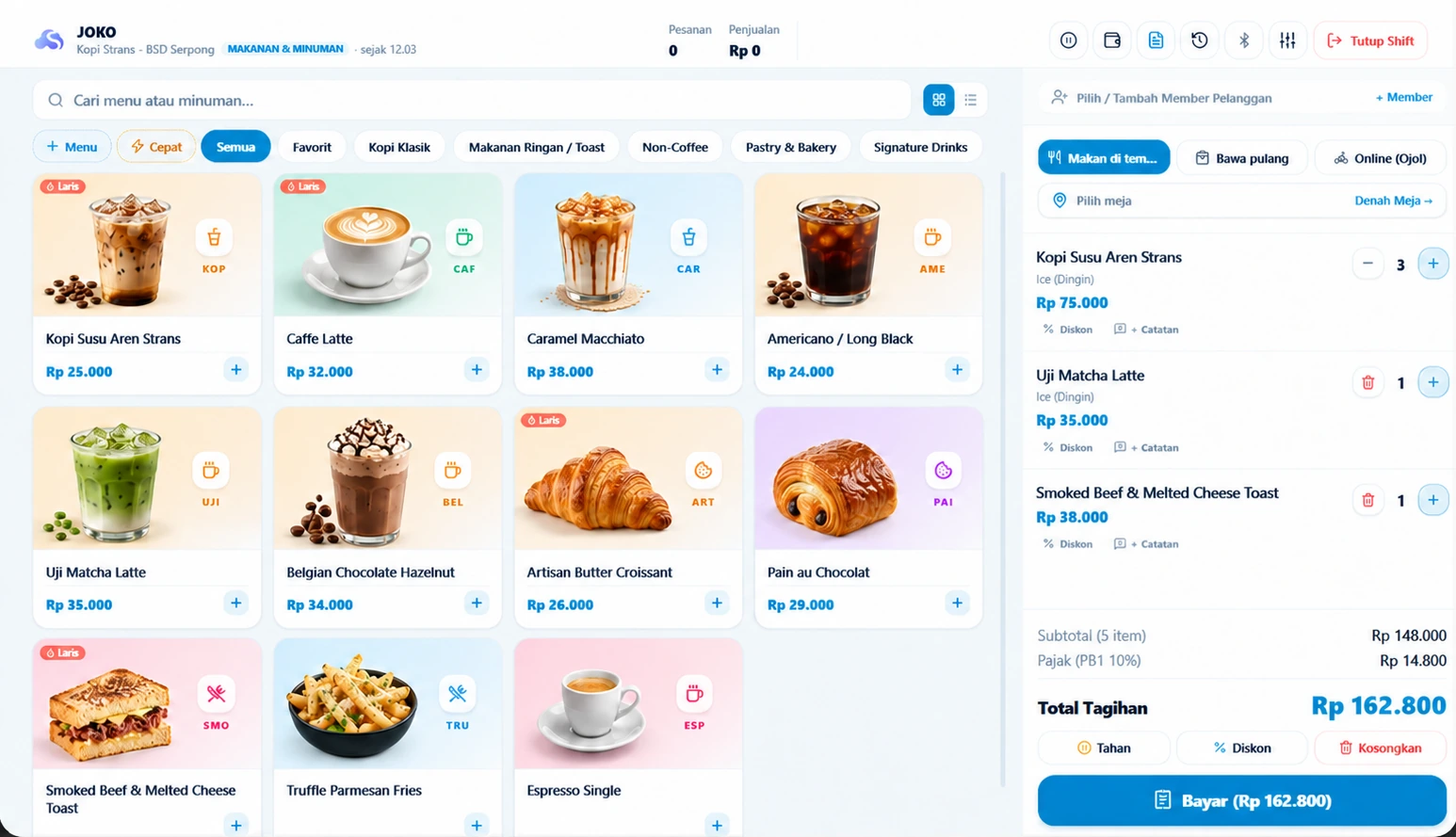
Checkout, stock and reports in the application. These screenshots come from different demo sessions; their figures are not one connected transaction.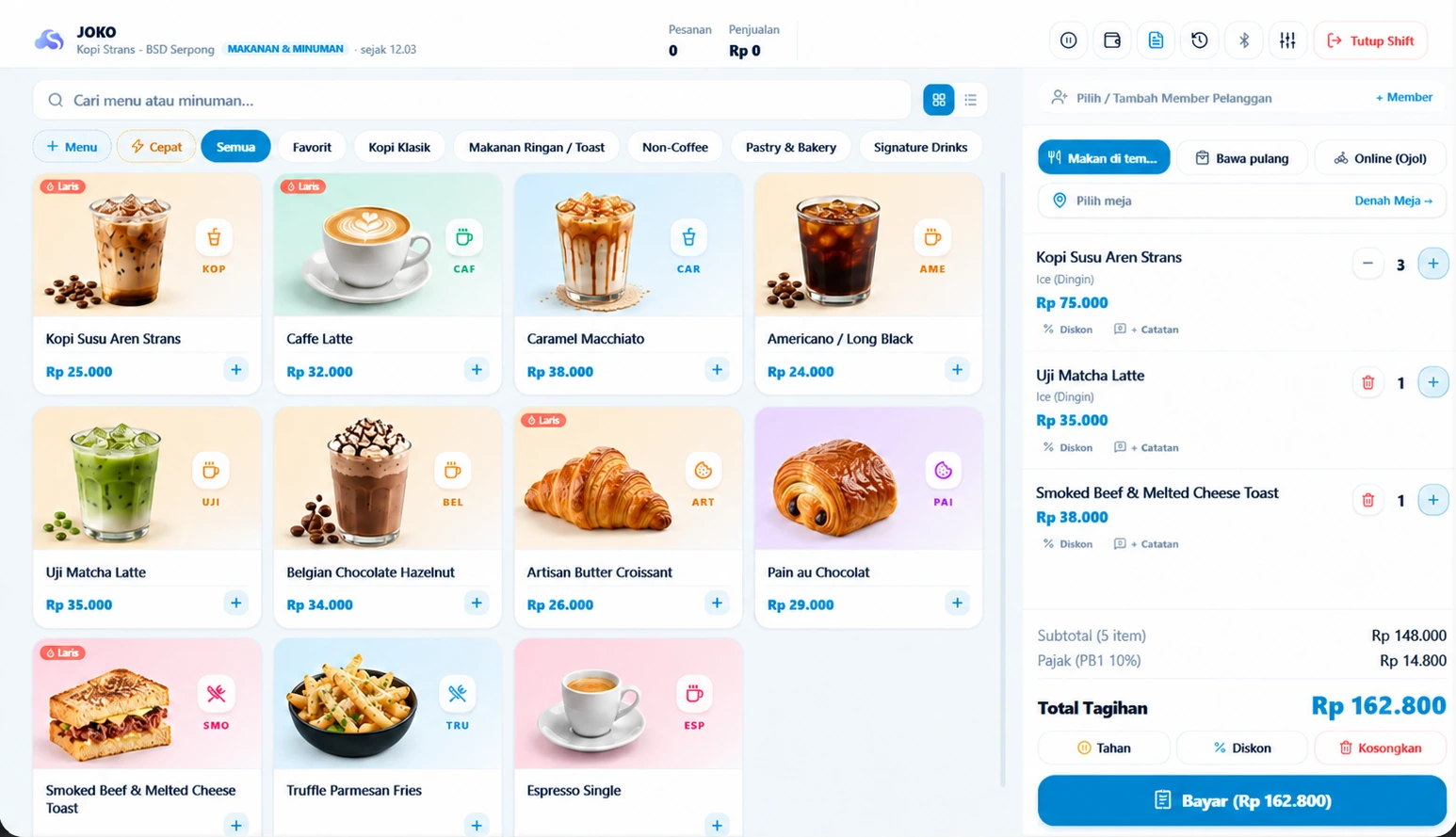


STRANS POS
See the work take shape.
This preview uses sample data. Our team can show you a product workflow that matches your business.
Checkout & sales
Build orders, choose a payment method, and hold orders. Split bills start with Cabang; printing depends on your device setup.
Products, variants & barcodes
Organize flavors, sizes, toppings, and SKU barcodes so cashiers can find products easily.
Inventory & stock audits
Track stock changes and reconcile them with physical counts. Stock counts start with Toko; stock transfers start with Cabang.
Cashier staff & multi-outlet
Outlet and staff limits depend on your plan. Custom roles and multi-outlet analytics start with Cabang.
Sales summaries & cost of goods
Review sales and payment summaries. Cost-of-goods calculations start with Cabang and require the cost data you enter.
Follow transaction status
Sales are recorded on the counter device and sent to the server. Check sync status before switching devices. Online payments require a connection.
STRANS POS / HARDWARE COMPATIBILITY
Match your hardware to your checkout workflow.
Printer, scanner, and drawer compatibility depends on the model, connection, and app or browser. Confirm your devices before purchasing or setting them up.
- 58mm & 80mm
Thermal Receipt Printers
Check the printer model, paper size, and connection before use.
- Bluetooth depends on app or browser support
- LAN printers require a configured gateway
- Receipt formats for 58mm & 80mm paper
- Test printing on your ESC/POS model
- RJ11 Port
Cash Drawers
Drawer opening depends on the printer, connector, and print setup.
- Check the printer's drawer-opening support
- Match the connector to your device specifications
- Follow the manufacturer's manual-key instructions
- Confirm the drawer model before purchasing
- Product Catalog
Barcode Scanners
Find products using codes registered in your catalog.
- Scanners that enter codes like a keyboard
- Codes must match the product catalog
- Test scanning before counter use
- Camera scanning depends on browser support
- Cross-Device
Tablets, Phones & Laptops
Access POS in a browser and check peripheral support separately.
- Choose a screen size suited to counter work
- Use an up-to-date browser
- Test the workflow on your tablet, phone, or laptop
- Printers and cameras need their own support
Already have POS hardware? We'll help check compatibility.
Share your device model, connection type, and operating system. Discuss compatibility and setup needs with the Strans Space team.
STRANS POS / PAYMENTS
Flexible payment recording
Record cash payments and payments received through QRIS, bank transfers, e-wallets, or card terminals. Dynamic QRIS starts with the Cabang plan and requires payment-provider activation; channels and fees depend on the provider.


From counter to decision
Record a sale. Follow the stock. See the result.
See how activity at the counter can help your team track stock and give owners a clearer picture. The illustration below uses sample data.
CHOOSE A PLAN
Start free, add capacity when needed.
The prices and limits below apply to Strans POS only. Compare capabilities before signing up.
Rintis Space
Free foreverNo subscription fee
Start selling and record your first transactions.
Upgrade whenever you need more.
- 1 outlet
- 1 staff accounts
- Transaction history: 3 months
- Product variants
- Add-on options
- Service duration
Toko Space
30-day free trialBilled every month
Organize stock, serve regular customers, and work with a small team.
For new businesses. No automatic charge.
- 1 outlet
- 3 staff accounts
- Transaction history: 12 months
- Stocktaking
- Sales returns
- Staff commissions
Cabang Space
A leading choice for multiple outletsBilled every month
Monitor sales, stock, and margins across your locations.
One plan covers your outlet allowance.
- 5 outlets
- 15 staff accounts
- Transaction history: 24 months
- Outlet comparisons
- Outlet stock transfers
- Costs & margins
Juragan Space
For your business networkBilled every month
Bring your outlet network and business types together in one account.
One plan covers your outlet allowance.
- 20 outlets
- Unlimited staff accounts
- Transaction history: 60 months
- Table management
- Kitchen display
- Table QR ordering
Only Toko includes a 30-day free trial for new businesses, once. Without paid activation, the account returns to Rintis after the trial. Cabang and Juragan activate after verified payment. Plan prices exclude payment/service fees; review the invoice before paying.
More detail. Easier decisions.
All plan benefits for food, retail, and service businesses in one comparison.
| Benefits & features | Rintis Space | Toko Space | Cabang Space | Juragan Space |
|---|---|---|---|---|
| Your business capacity | ||||
| Outlets | 1 | 1 | 5 | 20 |
| Staff | 1 | 3 | 15 | Unlimited |
| Transaction history | 3 months | 12 months | 24 months | 60 months |
| Customer contacts | 50 | 500 | 2,000 | Unlimited |
| Business types | 1 | 1 | 1 | Several |
| Checkout & catalog | ||||
| Product variantsSizes or colors with their own SKU and stock. | ||||
| Barcode scanningFind products by barcode. Requires a compatible camera or scanner. | ||||
| Add-on optionsAdd toppings or service options to an order. Food & services. | ||||
| Split billsSplit payments within an order. | ||||
| Dynamic QRISThe amount follows the bill. Requires payment provider activation; provider fees apply. | ||||
| Stock & purchasing | ||||
| Stock trackingTrack product or ingredient quantities. | ||||
| StocktakingCompare recorded stock with a physical count. | ||||
| Sales returnsRecord products returned by customers. | ||||
| Purchase ordersPrepare stock purchases from suppliers. | ||||
| Outlet stock transfersRecord inventory movement between locations. | ||||
| Reports & team management | ||||
| Costs & marginsReview costs and profit using the cost data you enter. | ||||
| Outlet comparisonsCompare location sales in the Dashboard. | ||||
| Staff permissionsControl access according to each staff member's role. | ||||
| For food businesses | ||||
| Table managementManage tables for dine-in orders. | ||||
| Kitchen displayView the order queue on a connected kitchen device. | ||||
| Table QR orderingCustomers open the menu and order through a table QR code. | ||||
| Duration, staff & service schedules | ||||
| Service durationRecord the time needed for each service. | ||||
| Staff assignmentsAssign the staff member who performs a service. | ||||
| Staff commissionsTrack commissions for services performed. | ||||
| Session packagesManage services sold as multi-session packages. | ||||
| AppointmentsSchedule customers' service appointments. |
A checkmark means the feature is included in the plan. Food and service features apply to the relevant business type. Rintis, Toko, and Cabang support one business type per account; Juragan supports several. Printing, kitchen displays, and payments require compatible devices and setup.
FAQ
Common questions before you start
What can I use on the free plan?
Rintis Space has no subscription fee. It includes 1 outlet, 1 staff account, and 3 months of transaction history. Checkout, catalog, transaction records, and the Dashboard are included; additional features depend on your plan. Hardware and payment-provider fees are separate where applicable.
What happens when the Toko trial ends?
New businesses can try Toko Space once for 30 days. Without paid activation, the account returns to Rintis after the trial. There is no automatic billing. Cabang and Juragan activate after payment is verified.
How do I start using checkout after signing up?
Open the signup page, enter your email, and follow business setup in the Dashboard. Set up your outlet and catalog, then create a pairing code in Checkout & Devices to connect POS. Check the outlet and products on the paired device before your first sale.
What should I check if the internet disconnects?
Online payments need a connection. If connectivity is interrupted, check transaction history and synchronization before repeating a sale, clearing browser data, or switching devices. Confirm records have synchronized to avoid recording the same sale twice.
Will my receipt printer work?
Compatibility depends on the printer model, connection, and application or browser. Receipt layouts support 58 mm and 80 mm paper, but Bluetooth or LAN support needs testing with your device. Share the model, connection, and operating system with our team before buying hardware.
Can I move my catalog from records or another application?
Discuss the catalog format and available columns with our team first. Check product names, SKUs, prices, units, and destination outlets before entering data. Transaction history, opening stock, and customer data need separate confirmation; do not assume everything transfers automatically.
Are all QRIS payments confirmed automatically?
No. Static QRIS requires staff to verify payment. Dynamic QRIS is available from Cabang and requires payment-provider activation. Channels, availability, and fees depend on the provider; payment proof alone is not automatic confirmation.
Ask about feature readiness before you start.
Some capabilities still need further testing. Our team will explain which features are ready for your business.
CONSULTATION & IMPLEMENTATION
Tell us how your business works.
We can help you see whether Strans POS fits today or learn what you need from future applications.
Workflow Consultation & Demo
Have specific checkout workflows, multi-branch, or printer needs? Discuss directly with our product team.